Forgetting your password is something almost every user experiences at some point, especially if you don’t log in regularly. On OK Win, accessing your account again is straightforward thanks to a built-in recovery option available directly on the login page.
Since your account is linked to your mobile number and used for real-money transactions, quickly and securely regaining access is important. The platform ensures that you can reset your password without complicated steps, but it’s still important to follow the correct process carefully.
If you’re unable to log in due to a forgotten password, this guide will help you restore access smoothly without confusion.
Step-by-Step Guide to Recover OK Win Password
Contents
- 1 Step-by-Step Guide to Recover OK Win Password
- 2 Why the Password Recovery Process Matters
- 3 Tips for Setting a Strong New Password
- 4 Common Problems During Password Recovery
- 5 What to Do After Resetting Your Password
- 6 Security Best Practices After Password Reset
- 7 How to Avoid Forgetting Your Password Again
- 8 Why You Cannot Access Your Account Without a Password
- 9 Conclusion
- 10 FAQs
Follow these exact steps to reset your password:
Step 1: Go to the login page in the app or on the official website.
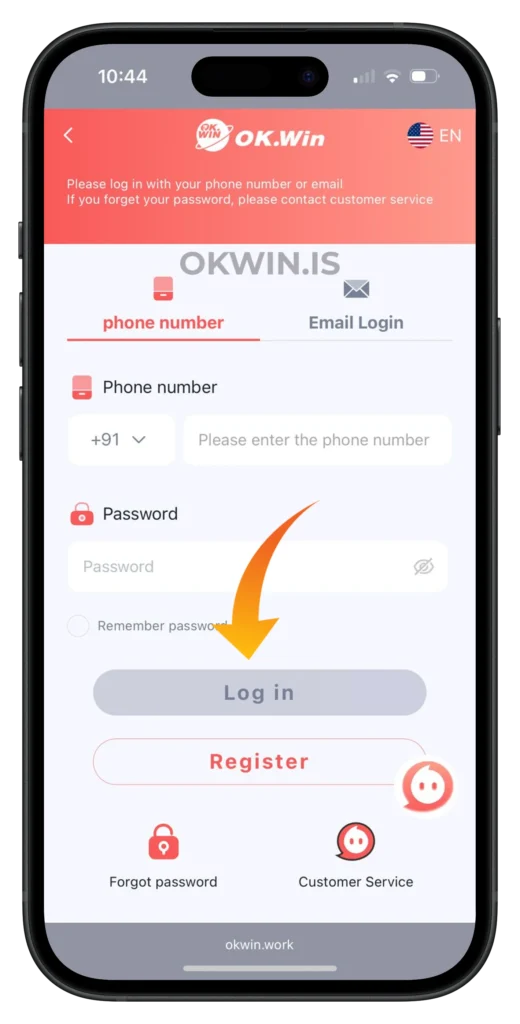
Step 2: Click on the “forget password” option below the login button.
Step 3: Follow the instructions provided to set a new password.
Once you complete these steps, your password will be updated, and you can log in again using your new credentials.
Why the Password Recovery Process Matters
The password recovery feature is designed to ensure that only the rightful account owner can regain access. Since OK Win accounts are tied to financial activity like deposits and withdrawals, maintaining account security is critical.
This process helps protect your funds, personal data, and gameplay history while still making it easy for genuine users to recover access.
Tips for Setting a Strong New Password
When resetting your password, it’s important to choose one that is both secure and easy for you to remember.
Avoid using simple passwords like “123456” or your name.
Use a combination of numbers and characters to make it stronger.
Do not reuse passwords from other platforms, especially those linked to financial services.
Make sure you store your password securely or remember it properly to avoid repeated resets.
Common Problems During Password Recovery
While the process is simple, some users may still face issues. Here are common problems and how to handle them:
If the “forget password” option is not working, refresh the page or reopen the app.
If instructions are not loading, check your internet connection and try again.
If you are unable to reset the password, ensure you are using the correct mobile number linked to your account.
In most cases, these issues are temporary and can be resolved quickly.
What to Do After Resetting Your Password
Once your password is successfully reset, the next step is to log in and verify everything is working correctly.
You can follow this login guide for a smooth experience.
After logging in, it’s a good idea to check your account details and ensure everything is secure.
If you’re planning to continue playing, you may also want to add funds.
Or if you already have funds, you can proceed to withdraw.
Security Best Practices After Password Reset
Resetting your password is also a good opportunity to improve your account security.
Never share your new password with anyone.
Avoid saving your password on public devices.
Log out after accessing your account on shared phones or computers.
OK Win uses encrypted systems and account protection measures to ensure user safety. For a deeper understanding of online account security, you can refer to.
How to Avoid Forgetting Your Password Again
While recovery is simple, it’s always better to avoid the situation altogether.
Use a password that is easy for you to recall but difficult for others to guess.
Consider noting it down in a secure place if needed.
Avoid frequently changing passwords unless necessary, as this increases the chance of forgetting.
Consistency and careful handling of login details can save time and prevent unnecessary frustration.
Why You Cannot Access Your Account Without a Password
Some users try to bypass login issues, but without the correct password, access is not possible.
This restriction is in place to protect your account from unauthorised access. Since your wallet, transactions, and personal data are linked to your account, strict login control is necessary.
The “forget password” feature is the only safe and official way to regain access.
Conclusion
Recovering your OK Win password is a quick and user-friendly process. With just a few simple steps, you can reset your password and regain full access to your account.
The key is to follow the correct steps, use your registered mobile number, and create a strong new password. Once done, you can continue enjoying games, managing your wallet, and exploring all platform features without interruption.
Always remember to keep your login details secure and avoid sharing them with anyone to maintain a safe gaming experience.
FAQs
How do I reset my OK Win password?
Go to the login page, click on “forget password,” and follow the instructions to set a new password.
What if the forget password option is not working?
Try refreshing the page, checking your internet connection, or reopening the app.
Can I recover my password without my mobile number?
No, you need access to your registered mobile number to reset your password.
How long does it take to reset the password?
The process usually takes just a few minutes if done correctly.
Is it safe to reset my OK Win password?
Yes, the process is secure and designed to protect your account from unauthorised access.